
.png)
Making home energy decisions easier to understand, and act on
A conceptual redesign of the Google Nest thermostat and companion app experience that transforms energy data into clearer schedules, adaptive modes and timely recommendations.
Team
6 designers
Timeline
10 weeks (2024)
Role
UX & Systems Designer
Platforms
Thermostat & Mobile app
At a Glance
The Challenge
Energy information existed, but users lacked clear connections between their temperature settings, daily routines, and energy consumption.

Our Response
We created a coordinated thermostat and mobile experience for planning schedules, managing modes, understanding energy patterns, and receiving timely recommendations.
My Contribution
I designed interactions across the thermostat and app, helped define how responsibilities should be divided between the two surfaces, and maintained consistency across workflows, controls, and system states.

My Role
Designing one experience across two very different interfaces
Cross-device workflows for modes, schedules, and temperature controls.


Thermostat navigation shaped around its physical controls.
Interaction and visual consistency across both interfaces.
Accessibility-informed controls, states, and color usage.
The thermostat needed to support quick decisions within a small circular display. The mobile app could accommodate deeper planning, customization, and analytics. My role was to help these touchpoints work as one understandable system.
The shared cross-device component system.


Key Design Decision
Give the thermostat only the actions users need in the moment, while using the app for planning, customization, and deeper energy insights.
The problem
Energy data existed. Clear next steps did not.
Nest helped users control their home temperature, but the experience did not clearly connect everyday settings with energy use and cost.
Make system status clearer
Users needed to quickly understand the active mode, target temperature, and recommended range.
Support different routines
Modes and schedules needed greater flexibility across rooms, days, and household preferences.
Turn data into guidance
Energy information needed to help users decide what to change, not simply report past usage.
How might we help households understand and adjust their energy use without making everyday temperature control more complicated?
Our goal was to make sustainability visible, actionable and easy to incorporate into daily routines.

One connected system. Two distinct responsibilities.
Rather than duplicating every feature across the thermostat and app, we considered what users would need from each surface.
Mobile app:
Plan and understand
Thermostat:
Act now
The thermostat prioritized quick, contextual actions. The app handled deeper planning, customization, and analysis.
The outcome

The final experience

01. Plan around real routines
A visual schedule helps users coordinate modes across rooms, days, and changing household routines.

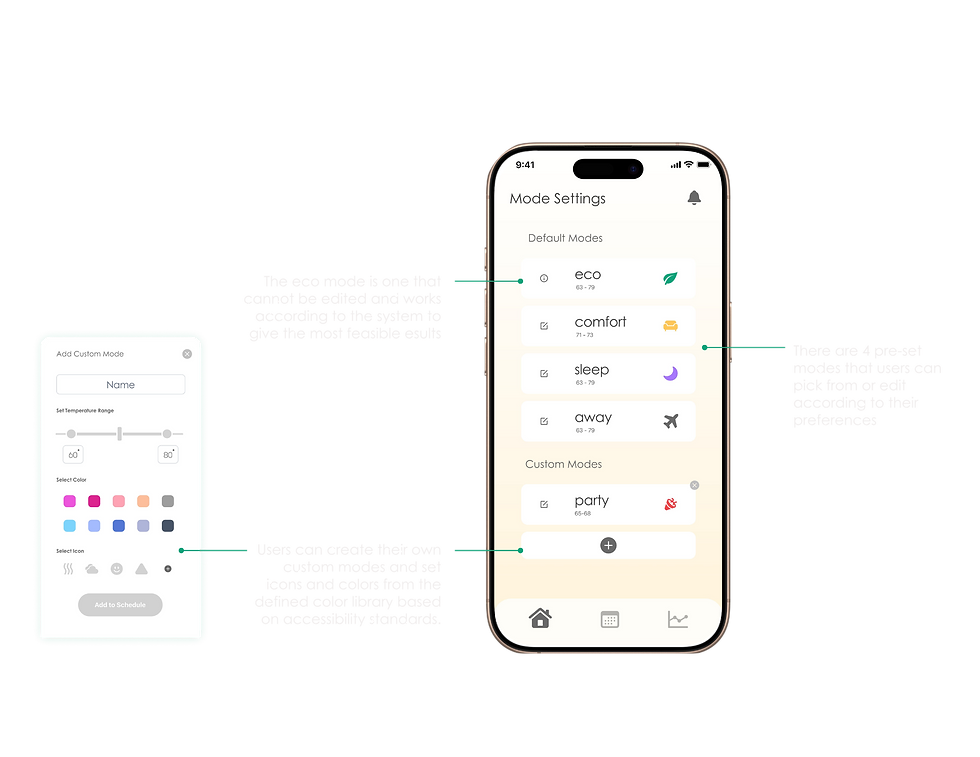
02. Balance comfort and efficiency
Adaptive Eco responds to changing outdoor conditions, while preset and custom modes support different comfort preferences.


03. Turn patterns into decisions
The analytics experience connects energy use, cost, temperature, and mode distribution, then suggests what the user can do next.
04. Receive timely guidance
Contextual notifications explain what changed, why it matters, and what action the user can take.
The Team
